In this guide you’ll run a coding agent that can create files, execute shell commands, and search a codebase - all with built-in sandbox restrictions and human approval for every destructive action.
The example defines a coding agent with sandbox tools that run directly on your machine, then invokes it with a client that handles approval prompts when the agent wants to execute commands or write files.
The agent gets six built-in sandbox tools (exec, read, write, edit, glob, grep) scoped to a workspace directory.
Since there’s no Docker container, destructive operations automatically suspend for your approval.
To use Docker, see this example instead.
Python
TypeScript
agents.py
Copy
import osfrom polos import ( Agent, max_steps, MaxStepsConfig, sandbox_tools, SandboxToolsConfig, LocalEnvironmentConfig,)workspace_dir = os.path.join(os.path.dirname(os.path.abspath(__file__)), "workspace")# Create sandbox tools that run locally on the hosttools = sandbox_tools( SandboxToolsConfig( env="local", local=LocalEnvironmentConfig( cwd=workspace_dir, path_restriction=workspace_dir, # prevent file access outside workspace ), ))# Define an agent that can write and run code locallycoding_agent = Agent( id="local_coding_agent", provider="anthropic", model="claude-sonnet-4-5", system_prompt=( f"You are a coding agent with access to the local filesystem. " f"You can create files, edit code, run shell commands, and search the codebase. " f"Your workspace is at {workspace_dir}. " f"Use the tools to complete the task, then summarize what you did and show the output. " f"Always verify your work by running the code after writing it. " f"In your final response, include the actual output from running the code." ), tools=tools, stop_conditions=[max_steps(MaxStepsConfig(count=30))],)
agents.ts
Copy
import { defineAgent, maxSteps, sandboxTools } from '@polos/sdk';import { anthropic } from '@ai-sdk/anthropic';import path from 'node:path';const workspaceDir = path.resolve(process.cwd(), 'workspace');// Create sandbox tools that run locally on the hostexport const tools = sandboxTools({ env: 'local', local: { cwd: workspaceDir, pathRestriction: workspaceDir, // prevent file access outside workspace },});// Define an agent that can write and run code locallyexport const codingAgent = defineAgent({ id: 'local_coding_agent', model: anthropic('claude-sonnet-4-5'), systemPrompt: `You are a coding agent with access to the local filesystem. ` + `You can create files, edit code, run shell commands, and search the codebase. ` + `Your workspace is at ${workspaceDir}. ` + `Use the tools to complete the task, then summarize what you did and show the output. ` + `Always verify your work by running the code after writing it. ` + `In your final response, include the actual output from running the code.`, tools, stopConditions: [maxSteps({ count: 30 })],});
Key things to notice:
env: "local" runs tools directly on the host - for container isolation in production, use "docker" instead (see Sandbox Tools)
path_restriction / pathRestriction confines file operations to the workspace directory
Exec security defaults to approval-always for local mode - every shell command suspends for your approval
The agent gets six tools automatically: exec, read, write, edit, glob, grep
The main.py / main.ts file invokes the agent and streams workflow events. When the agent wants to run a command or write a file, Polos suspends execution and emits a suspend event. The client catches the event, shows you what the agent wants to do, and asks for your approval. When you approve, it resumes the agent exactly where it left off.Here’s the core pattern:
Python
TypeScript
main.py (key pattern)
Copy
from polos import PolosClientfrom polos.features import events# Invoke the agenthandle = await client.invoke(coding_agent.id, { "input": "Create hello.js that prints 'Hello, world!' and run it.", "streaming": True,})# Stream events - approve each exec/write/edit when the agent suspendsasync for event in events.stream_workflow(client, handle.root_workflow_id, handle.id): if event.event_type and event.event_type.startswith("suspend_"): step_key = event.event_type[len("suspend_"):] form = event.data.get("_form", {}) context = form.get("context", {}) print(f"\n Agent wants to: {context.get('command') or context.get('tool', step_key)}") approved = input(" Approve? (y/n): ").strip().lower() == "y" await client.resume(handle.root_workflow_id, handle.id, step_key, {"approved": approved})
main.ts (key pattern)
Copy
import { PolosClient } from '@polos/sdk';// Invoke the agentconst handle = await client.invoke(codingAgent.id, { input: "Create hello.js that prints 'Hello, world!' and run it.", streaming: true,});// Stream events - approve each exec/write/edit when the agent suspendsfor await (const event of client.events.streamWorkflow(handle.rootWorkflowId, handle.id)) { if (event.eventType?.startsWith('suspend_')) { const stepKey = event.eventType.slice('suspend_'.length); const context = (event.data as any)?._form?.context ?? {}; console.log(`\n Agent wants to: ${context.command ?? context.tool ?? stepKey}`); const answer = await rl.question(' Approve? (y/n): '); await client.resume(handle.rootWorkflowId, handle.id, stepKey, { approved: answer.trim().toLowerCase() === 'y', }); }}
The cloned example includes a richer approval UI with detailed previews of commands, file contents, and path access requests. The pattern above shows the core concept.
Starting local sandbox worker... Agent: local_coding_agent Tools: [exec, read, write, edit, glob, grep] Environment: local (no Docker) Exec security: approval-always (default for local) Press Ctrl+C to stop
Terminal 2 - Invoke the agent:
Copy
python main.py
The agent will start working on the task. Each time it wants to write a file or run a command, you’ll see an approval prompt:
Copy
============================================================ WRITE APPROVAL REQUIRED============================================================ The agent wants to use the "write" tool: Path: /path/to/workspace/hello.js Content: console.log("Hello from the local sandbox!"); Approve this operation? (y/n): y -> Approved. Resuming...============================================================ COMMAND APPROVAL REQUIRED============================================================ The agent wants to run a command on your machine: Command: node hello.js Directory: /path/to/workspace Approve this command? (y/n): y -> Approved. Resuming...
Approve each step and the agent will create the files, run them, and report the results.
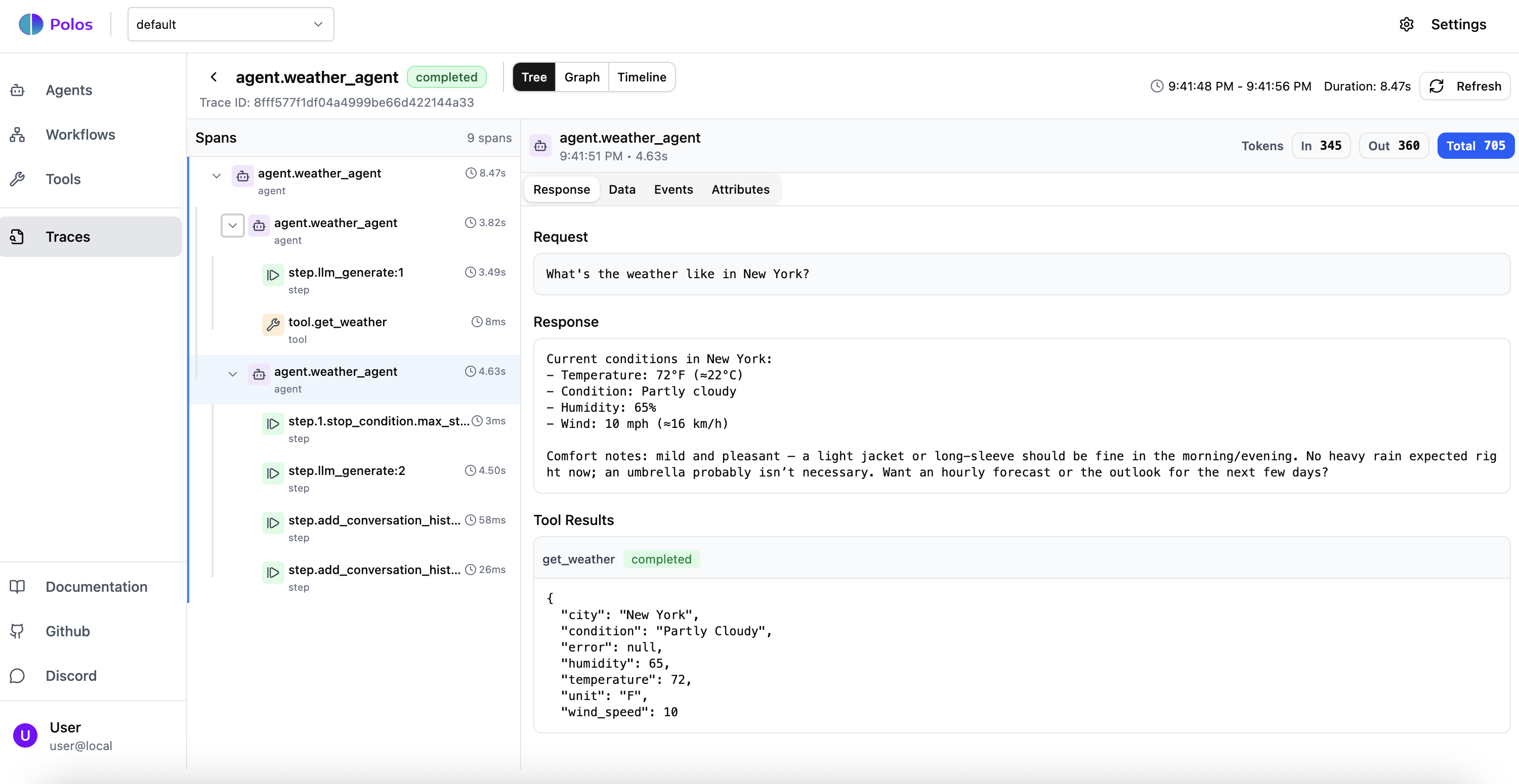
Open http://localhost:5173 to see your agent execution in the Polos dashboard. You can trace every step, see tool calls, and inspect the agent’s reasoning.The execution trace shows every step of your agent’s run, including LLM calls, tool invocations, and their inputs/outputs:The graph view visualizes the execution flow, making it easy to see how steps relate to each other:
The worker registered the local_coding_agent and its sandbox tools with the orchestrator
The client submitted a task - the orchestrator called back to the worker to execute the agent
The agent decided to write a file → Polos suspended execution and asked for your approval
You approved → Polos resumed execution exactly where it left off
The agent ran the code in a sandboxed environment with path restrictions
Every step was durably checkpointed - if the process crashed mid-execution, it would resume from the last completed step without re-running the LLM calls you already paid for
This is Polos in action: sandboxed execution, human-in-the-loop approval, and durable state - all without writing retry logic, state machines, or approval infrastructure yourself.